
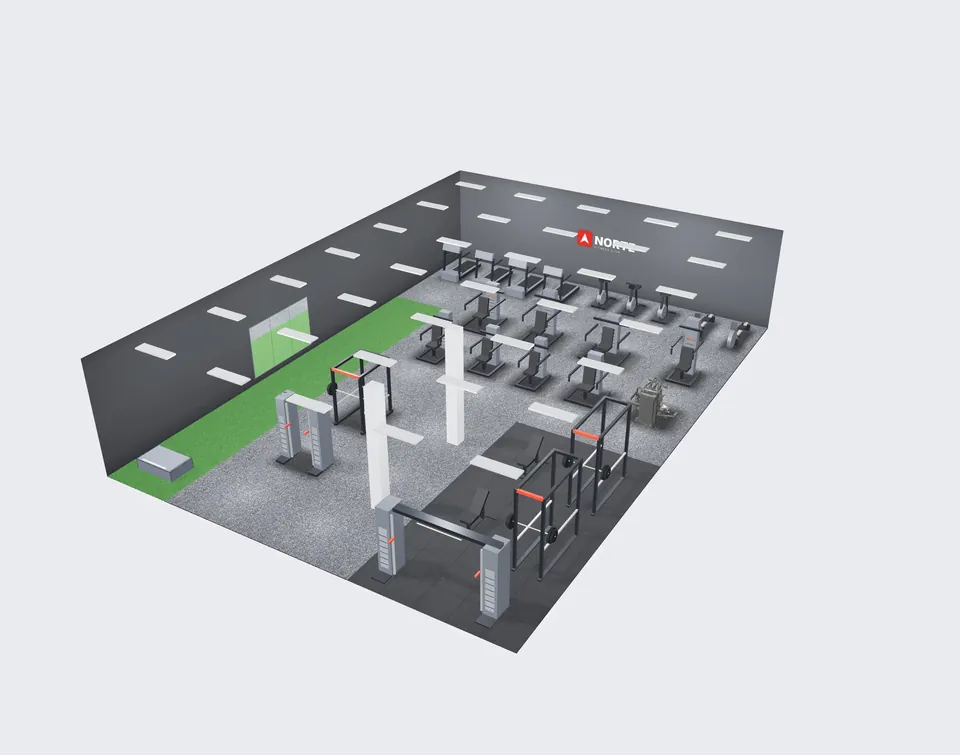
 2400 px
View render
A 2400 px wide image of the current view, clean, without guides, ready to present or share.
NEWFor Impulse distributors
Impulse México's platform for its distributors. You send your link by WhatsApp; your prospect measures their space, places equipment from the Impulse catalog, walks through it in 3D, analyzes it and sends it to you. Your team quotes it and follows up in your account's CRM and inventory.
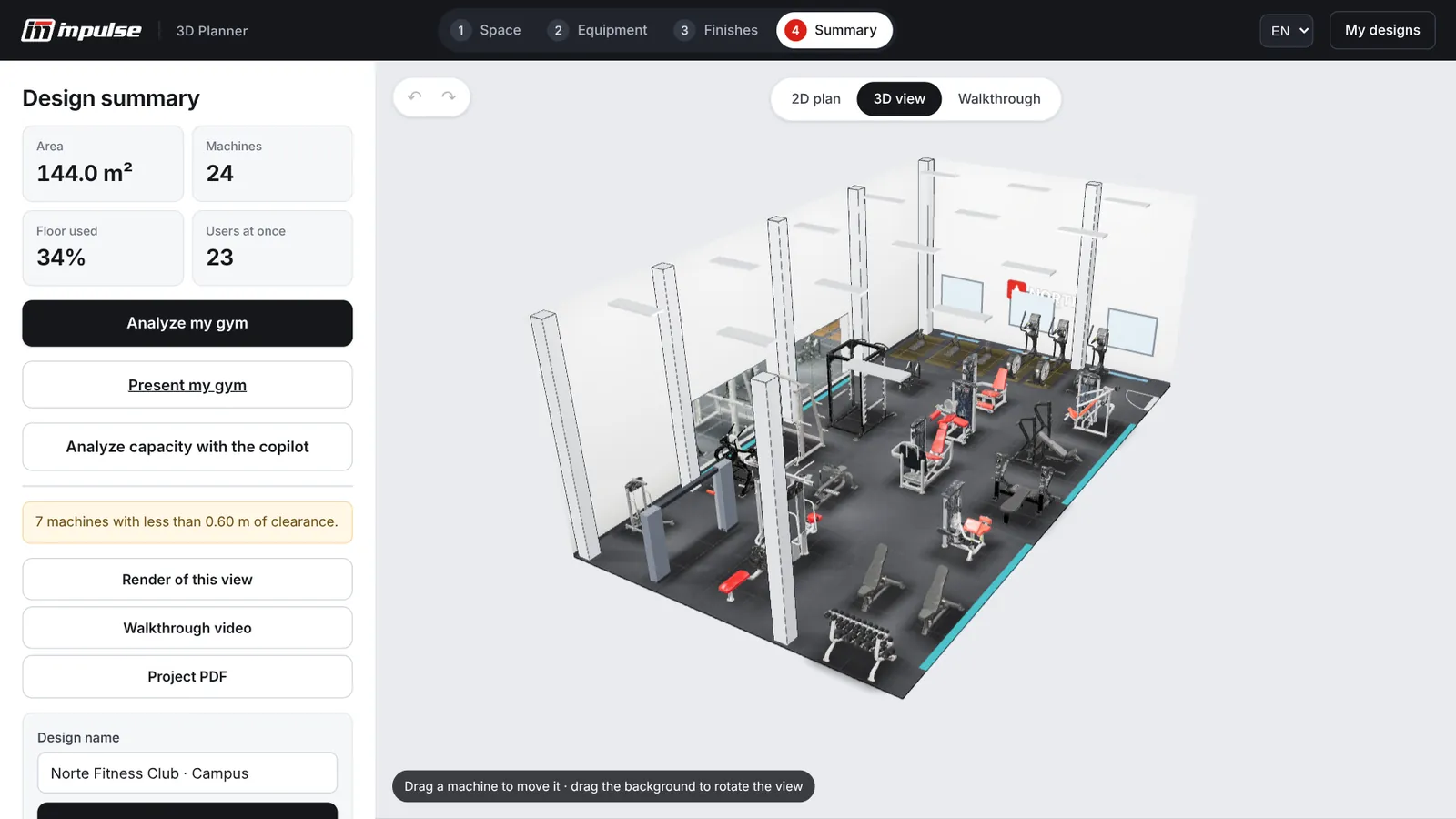
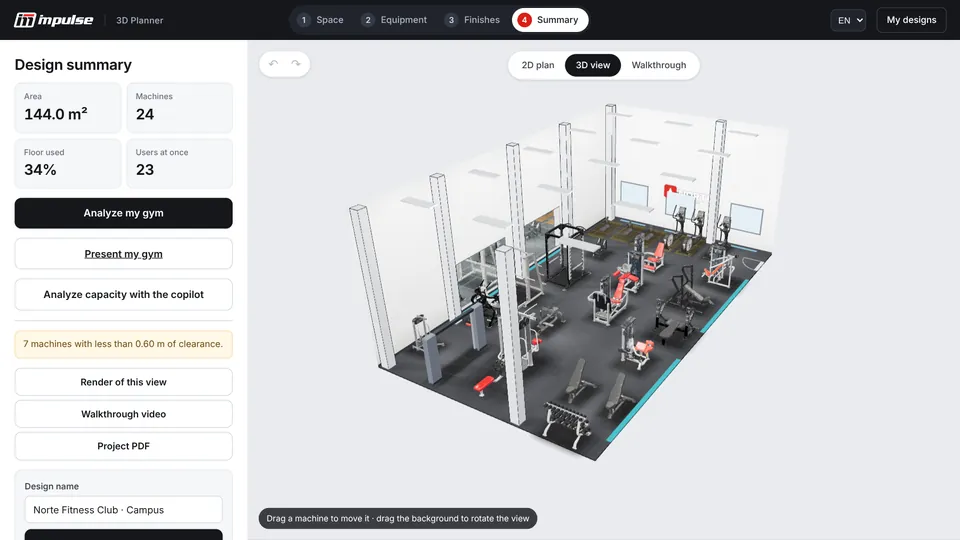
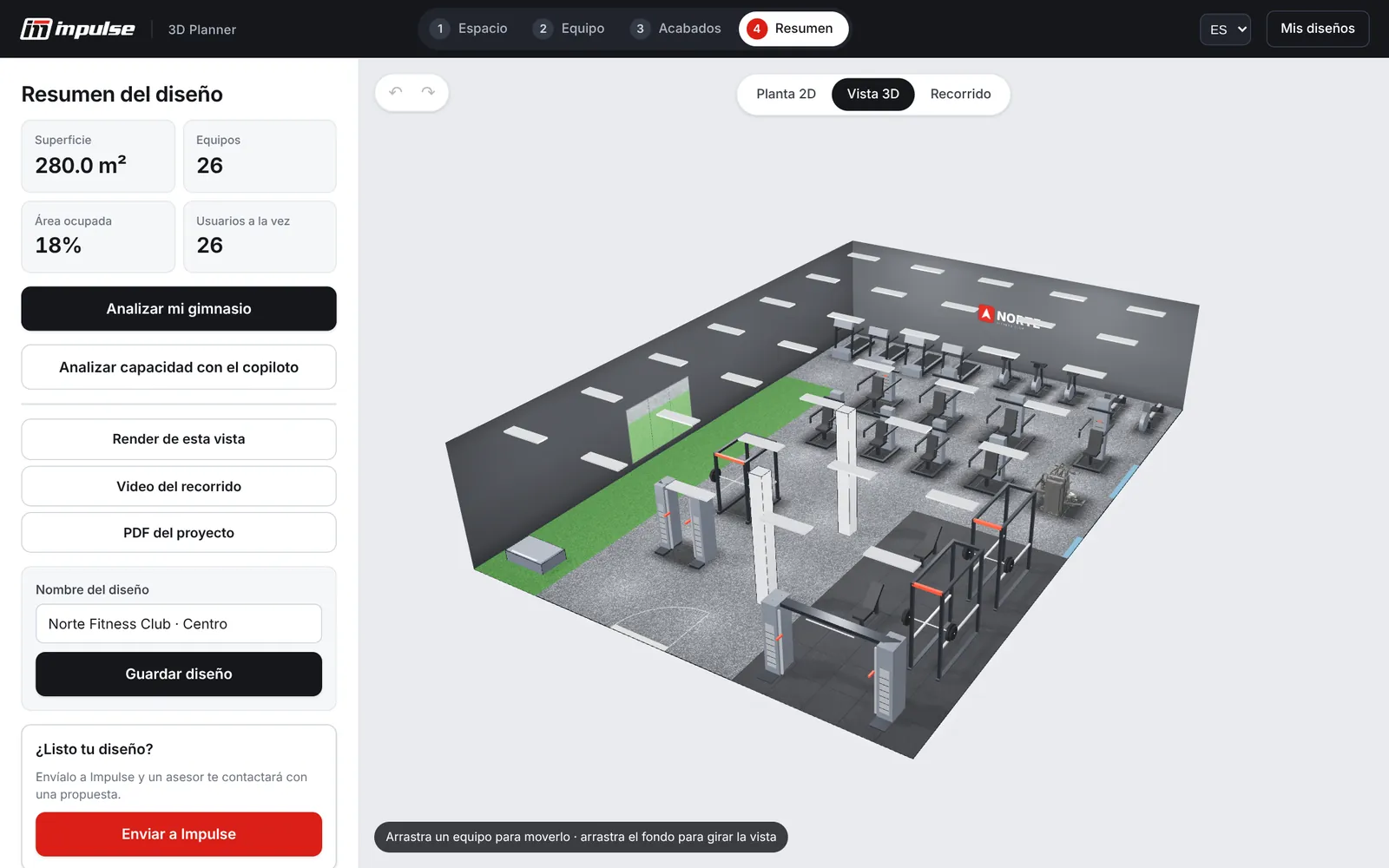
Actual platform screenshot. Step 4 of 4, ready to send.Sample university gym · 9 × 16 m · 24 machines
What your prospect sees
With one click, the platform records a 14-second tour inside the gym your prospect designed. They share it with their business partner, their committee or their family; you use it to close.
Videos generated by the platform with the “Walkthrough video” button, unedited.14 s · MP4 · ready for WhatsApp
Why it works
Equipping a gym is a big decision, and it almost always stalls on doubts: how it will look, whether it fits, whether it is enough for the people they expect. The platform clears up those doubts before you talk price and gives your prospect reasons to move forward with you.
When prospects lay out their own gym, they invest time and enthusiasm. That project is already theirs and they want to see it built: your quote is the natural next step.
The 3D view and the walkthrough answer the question that holds back the purchase: how will it look? With fewer doubts, the decision comes sooner.
The free analysis of their gym is a reason to contact an owner who is not looking for you today. People who receive something useful listen to the proposal.
Scores from 0 to 100, peak-hour queues and comparison against gyms of the same type. Your recommendation stops being an opinion and becomes a diagnosis.
Seeing how many members are waiting their turn, or which training modality is missing, shows what the gym fails to earn without the right equipment.
The design reaches you with contact details, call or visit preference and the equipment list. You respond the same day, ahead of the competition.
They design for free from their phone or computer, with nothing to install, and take away a PDF, render, video and presentation.
Every gym you have already equipped can be analyzed: what it lacks, what it has in excess and what is worth replacing. Expansions and renovations with catalog codes.
Universities, hotels, corporate facilities, condominiums and rehabilitation centers present the project to their committee with data and a 3D walkthrough.
How it works for your company
your-company.impulsefitness-planner.ai
Designs from your link are not shared with other distributors. Anyone who comes in without a link is served by Impulse México.
Free · nothing to install
Design your gym in 3D
 Scan or go to
Your Fitness Company · 55 0000 0000 · sales@yourcompany.com
 Design your gym in 3D · Your Fitness Companyimpulsefitness-planner.ai10:42
What your prospect does
From the very first step, the platform offers the shortest path: they have a floor plan, they are in a hurry, they want guidance, or they already have a gym in operation.
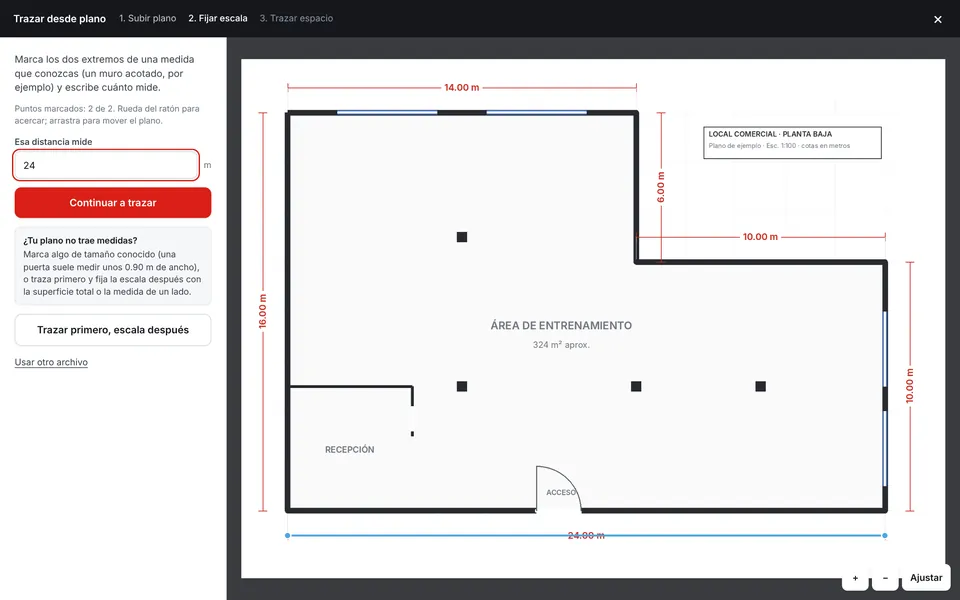
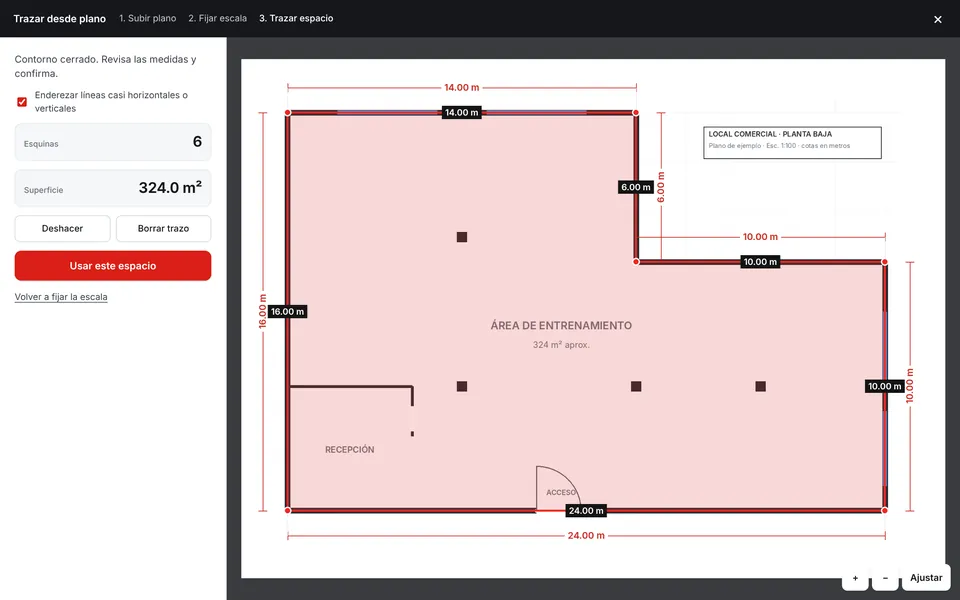
They upload their floor plan in PDF, PNG or JPG, set the scale with a known dimension and trace the outline, even if it is L-shaped. Or they type width, length and height in meters or feet.
They enter dimensions and shape, choose from 7 gym types and get a complete proposal with its score: the recommended one or the one that fills the space to the maximum.
A five-question conversation: dimensions, gym type, activities, target of people per day or members per month, and opening hours. It shows them two calculated proposals before they build their own.
They upload the list of the equipment they already have, as a PDF, Excel file or photo. The platform recognizes each machine, finds its Impulse equivalent and tells them what is missing, what is in excess and what is worth replacing.
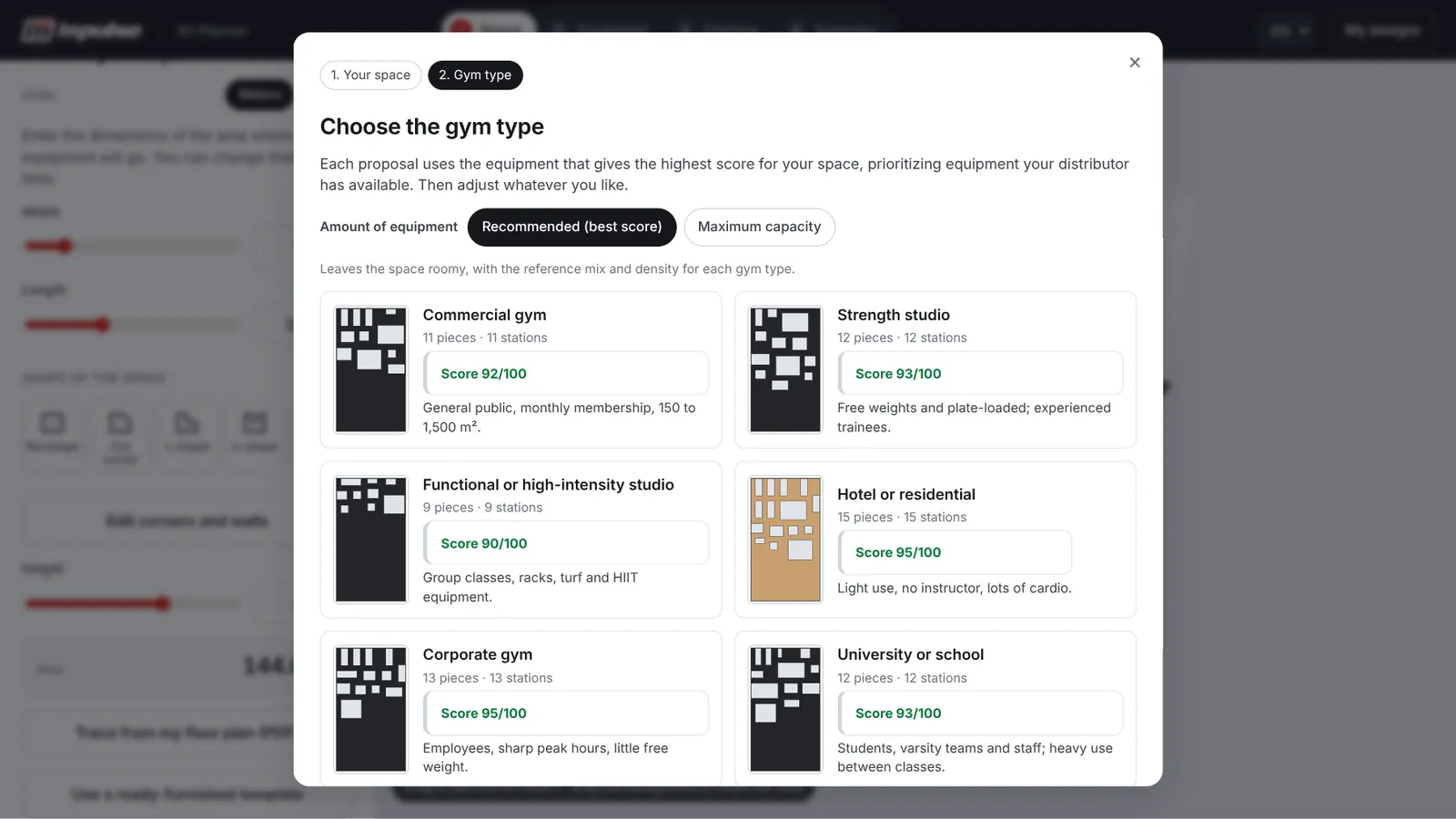
Seven calculated proposals for the same 9 × 16 m space, one per gym type.Recommended or at maximum capacity
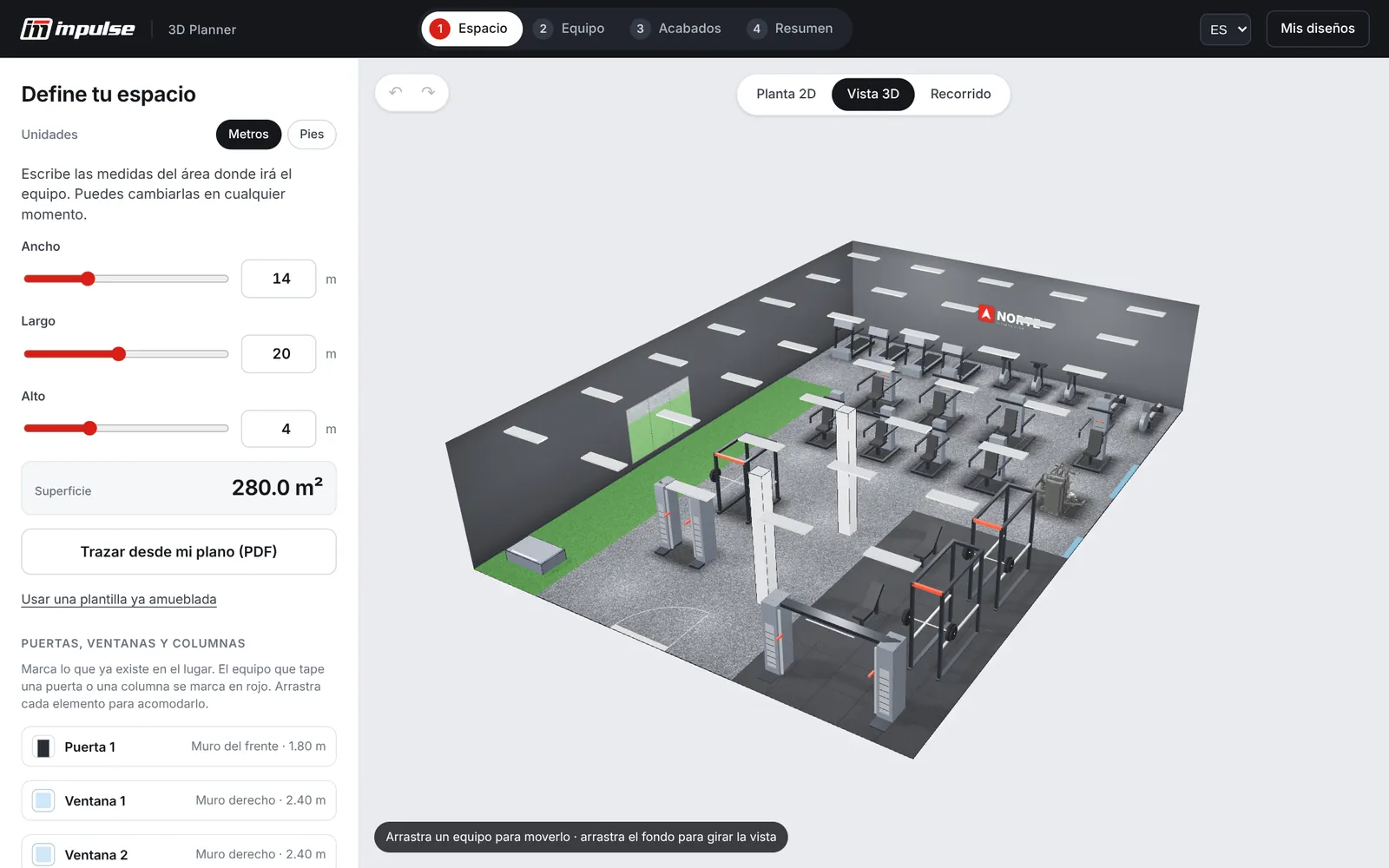
Step 1 · Space
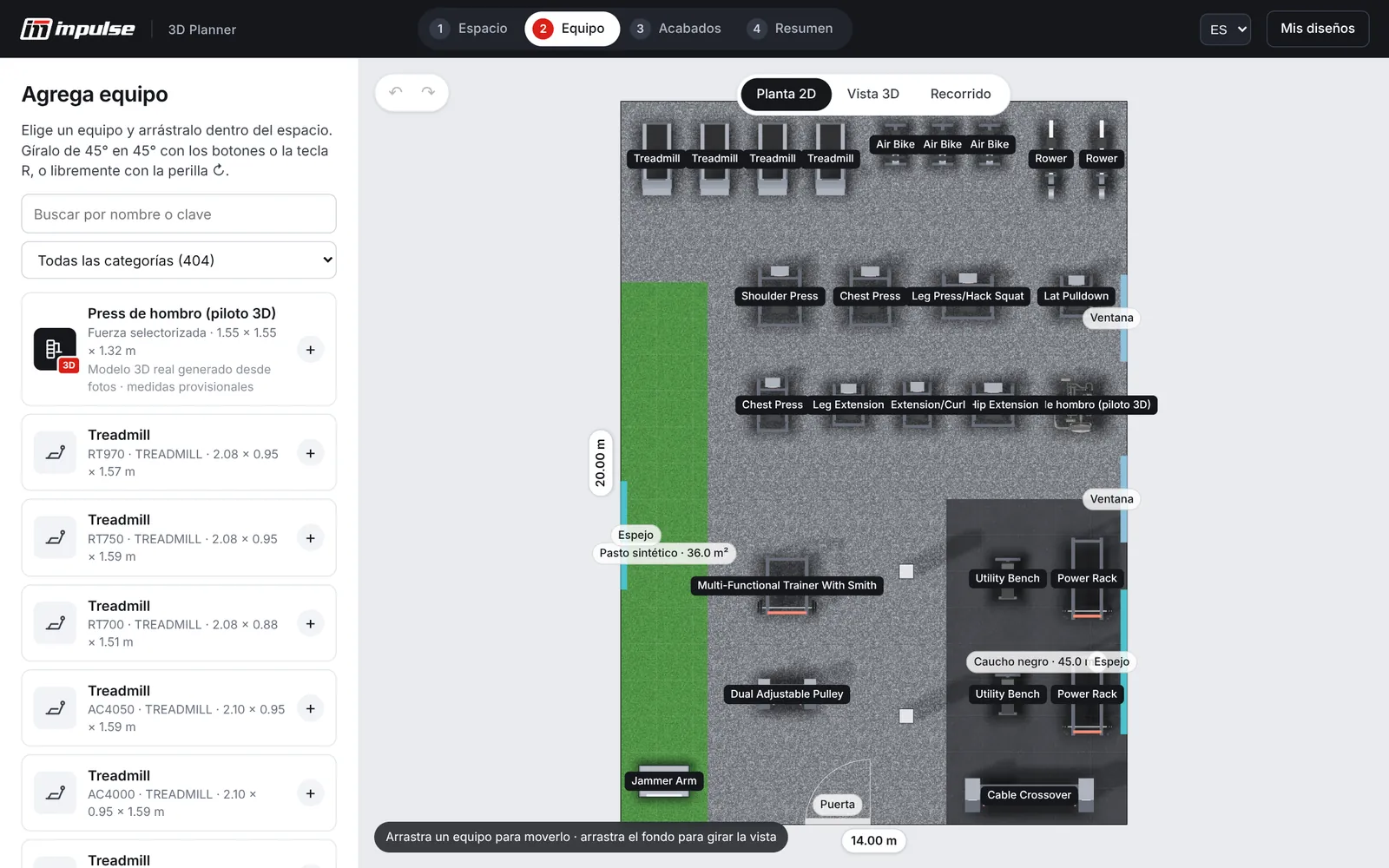
Step 2 · Equipment
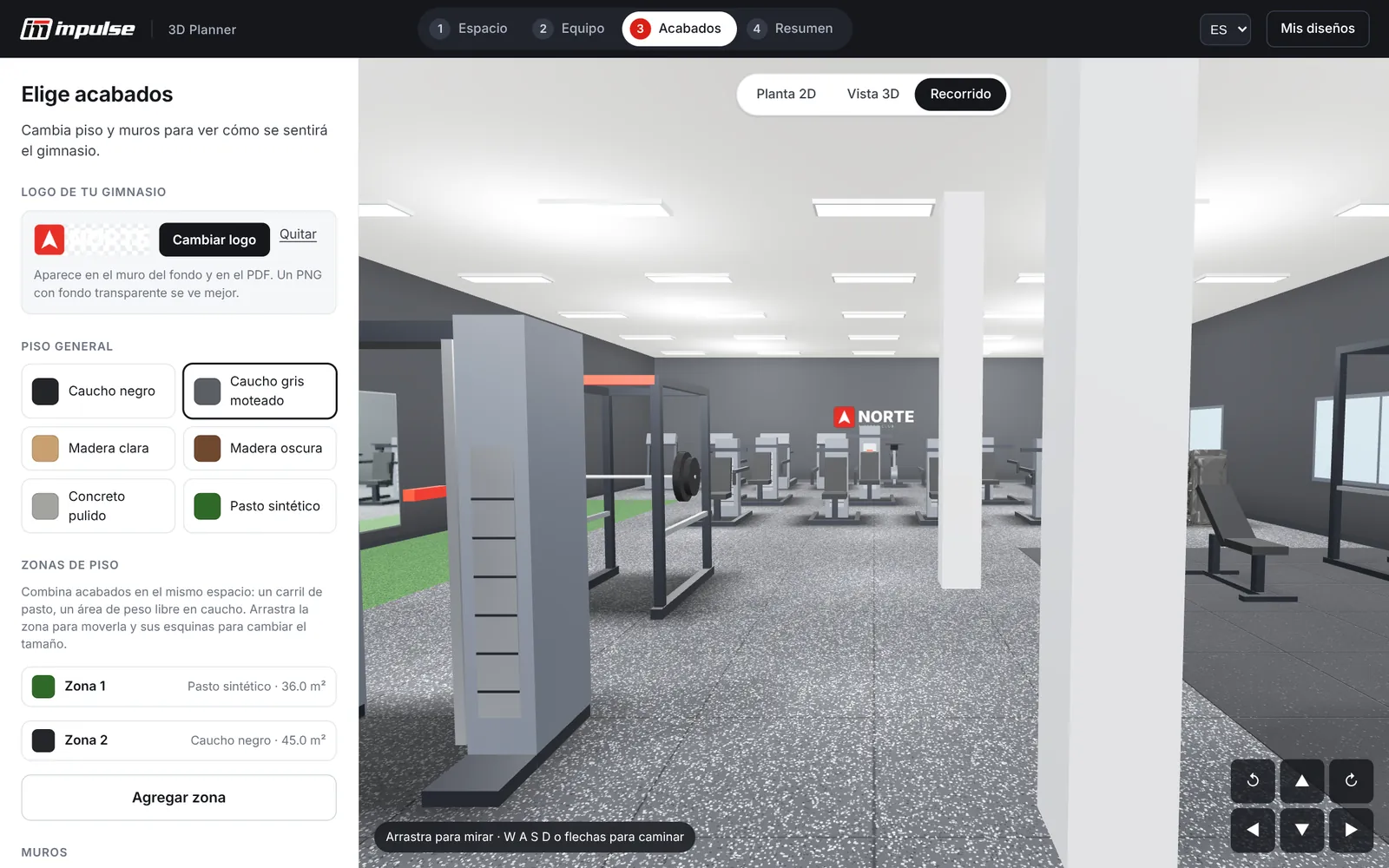
Step 3 · Finishes
Step 4 · Summary
Analyze my gym
The platform compares the design with gyms of the same type, scores it from 0 to 100 and points out where equipment is missing. For each gap it proposes Impulse catalog codes that are added to the design with one click.
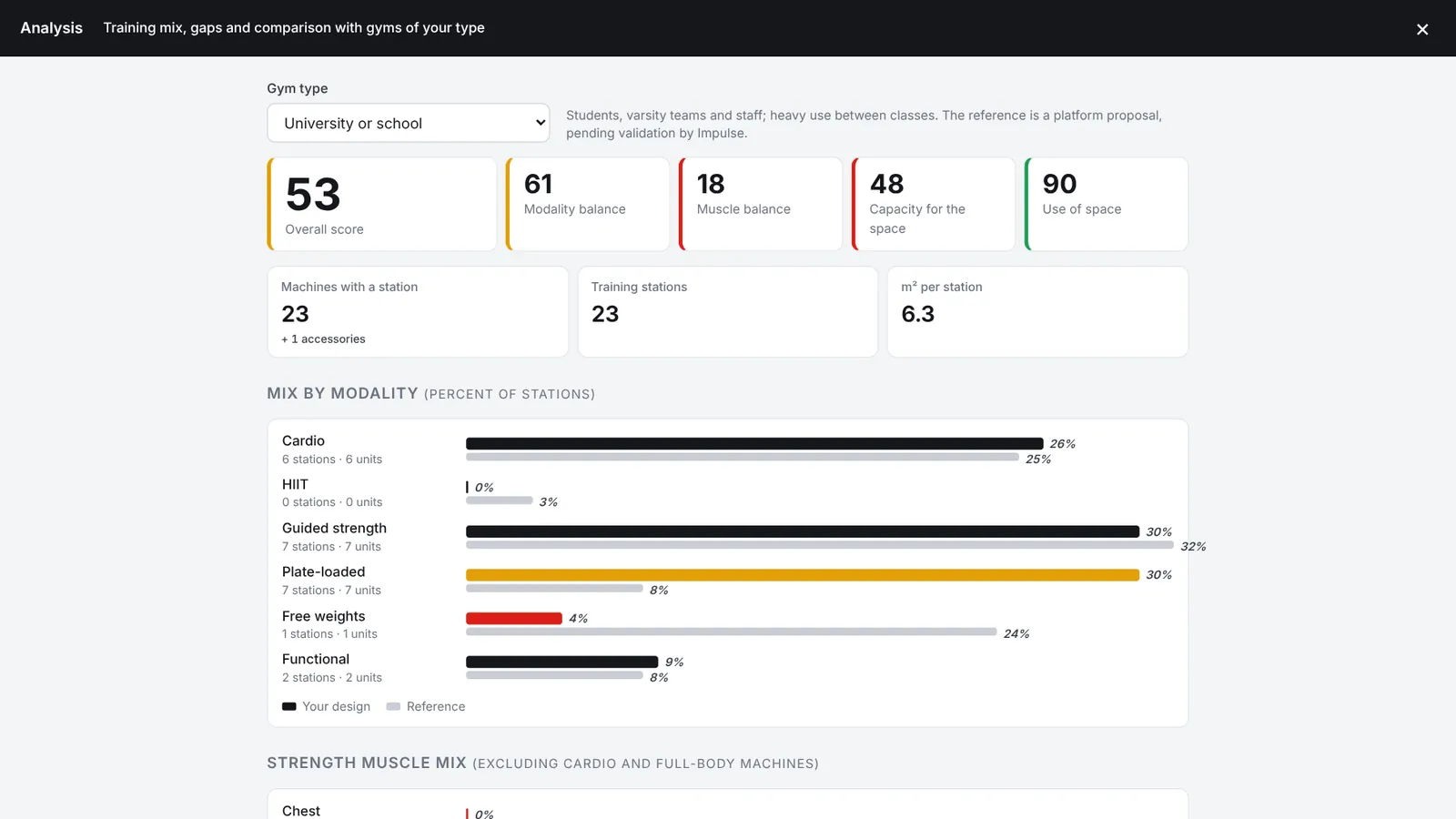
Actual screenshot with the sample university gym, compared against the university or school benchmark.Red: below the benchmark · amber: above
Green from 75 up, amber from 50 to 74 and red below 50, so you can see at a glance what to address first.
Combines the other four: 30% modality balance, 25% muscle balance, 25% capacity and 20% space use.
What share of the stations goes to cardio, HIIT, guided strength, plate-loaded, free weights and functional, against the benchmark.
How strength stations are split among chest, back, shoulders, arms, legs and glutes, and core.
Training stations per 100 m² compared with the typical density for the gym type.
Percentage of the floor occupied by equipment compared with the healthy range, and pairs of machines placed too close together.
Each modality or muscle group 8 points or more below the benchmark appears with the missing stations and three catalog codes. The + button adds them to the design.
Modalities where expected demand exceeds available stations by 30% or more: that is where people will wait their turn.
What is in excess, 15 points or more above, so you do not buy more of the same.
Floor area, m² per station, stations per 100 m² and occupied floor, each with its benchmark value.
Indicative member profile based on the equipment mix: strength, health and weight control, group training or guided machines.
Paired “your design vs. benchmark” bars, with stations and number of machines per row.
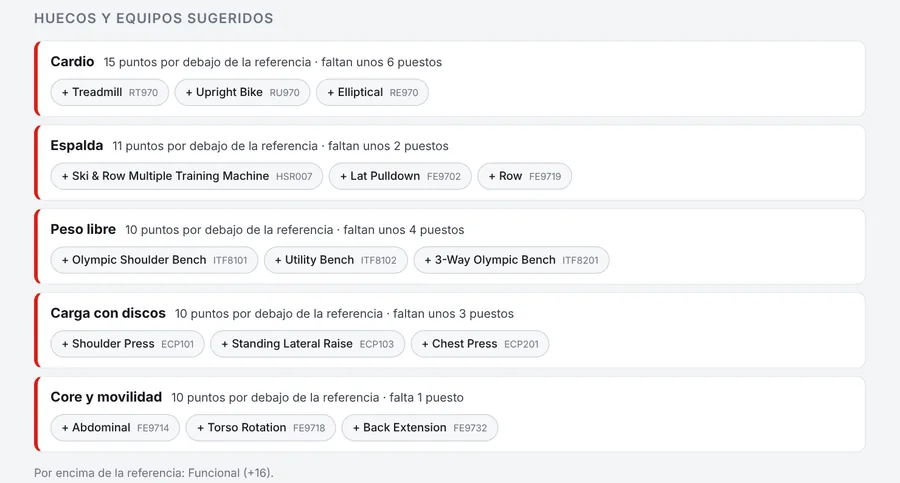
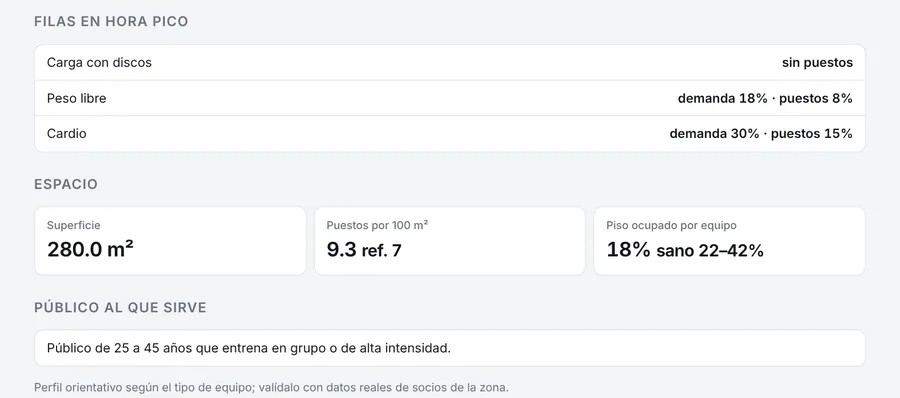
Each benchmark sets the split of stations by modality and by muscle group, the stations per 100 m² and the healthy range of occupied floor. Choose a type to see its mix.
Initial platform benchmarks, based on common industry criteria; they are being refined with Impulse.
General public, monthly membership, from 150 to 1,500 m².
For gyms that are already open
The owner of an operating gym uploads their equipment list and gets the same diagnosis as a new project, titled “Your gym today”. The quote you receive includes only the new items.
Purchases are prioritized by measured gaps and queues, not by intuition.
It detects the modalities where members wait their turn and how many stations are missing.
What is in excess, or no longer fits the gym type, shows up in the analysis; the space goes to what actually attracts members.
The PDF with the analysis, the presentation and the walkthrough help present it to partners or to management.
From the CRM you invite gyms in your area and your customers with a ready-made message and a link that opens the analysis directly. Every gap they find becomes a proposal from you.
Customers you have already equipped turn into expansions, renovations and replacements, with specific catalog codes.
Present my gym
The floor plan sheet turns into 3D and moves through each zone with its equipment, stations and gaps; it closes with the score and what is missing. It opens in a tab and is projected in the meeting with the partner, the committee or the client.
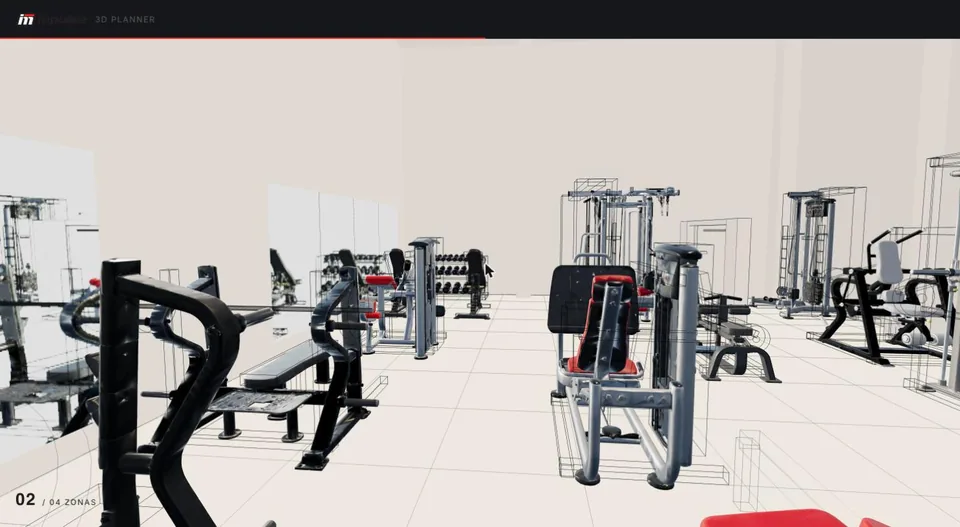
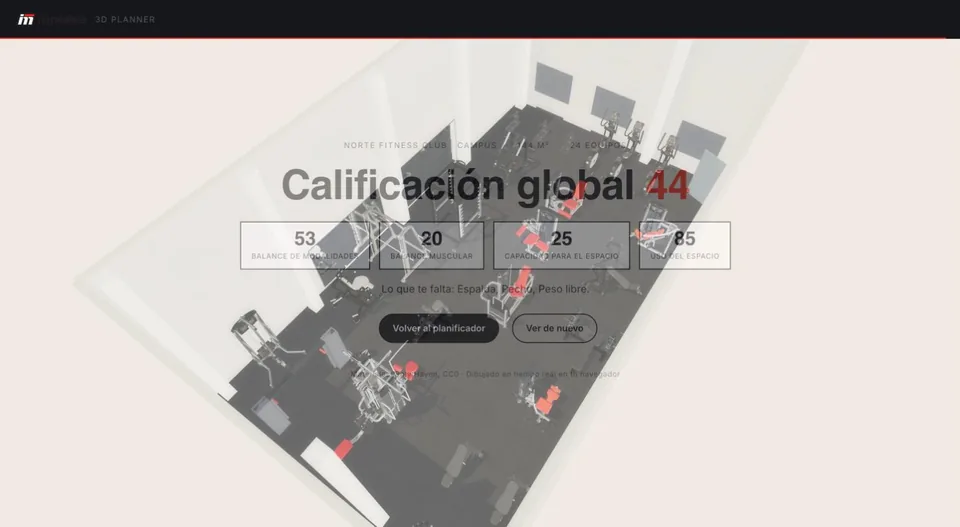
Three ways to see it
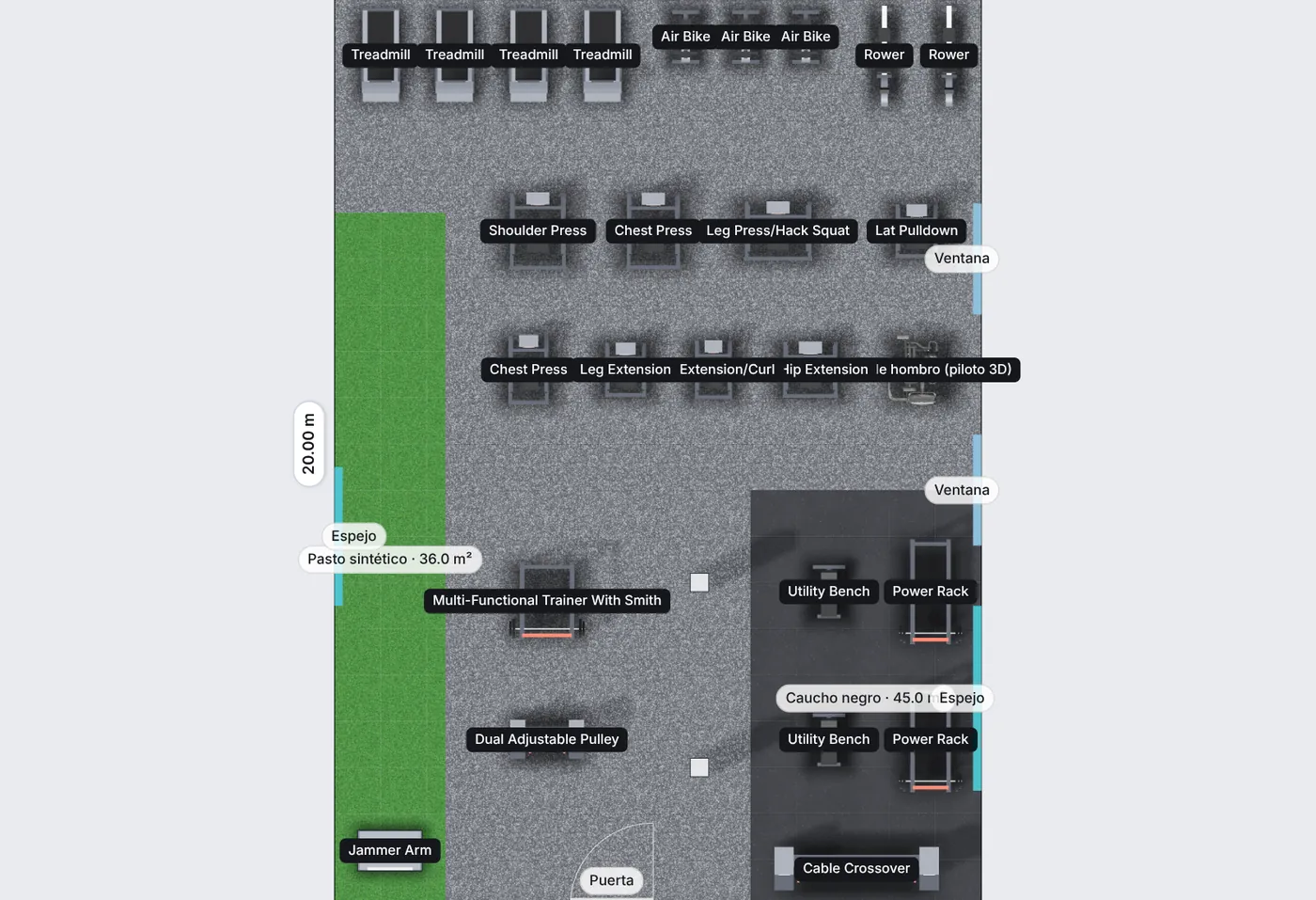
Space dimensions, a label on each machine and zones with their area. The client's floor plan can stay in the background.
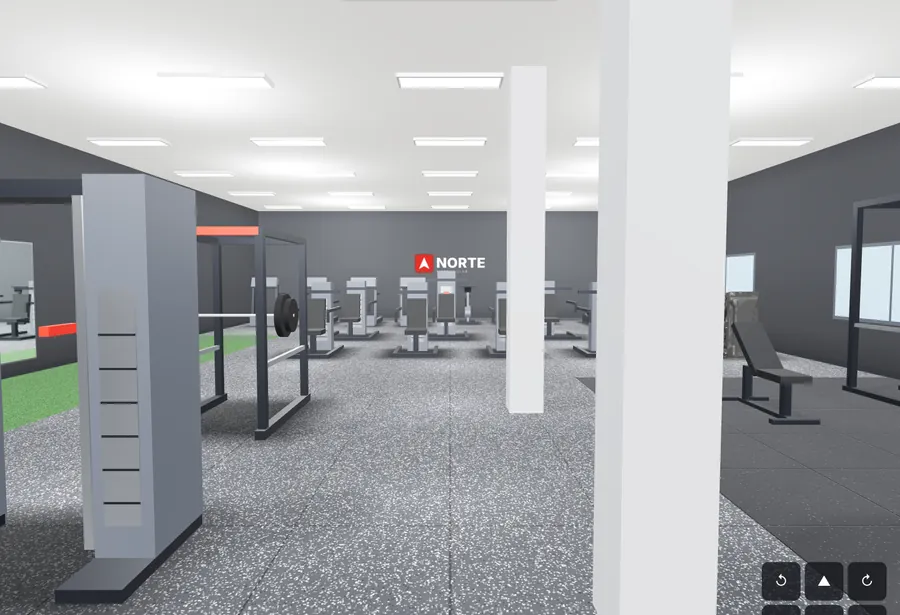
Rotate, zoom and move equipment directly in 3D, with floor, walls, logo and site elements.
Walk inside with W A S D, the arrow keys or touch buttons, at eye level.
Deliverables
Everything is generated in the browser, in the user's language, without waiting for anyone. Besides the presentation, they take away three files.
2400 pxA 2400 px wide image of the current view, clean, without guides, ready to present or share.
 14 s
14 sAn automatic 14-second tour inside the space, recorded in the browser to send by WhatsApp or email.
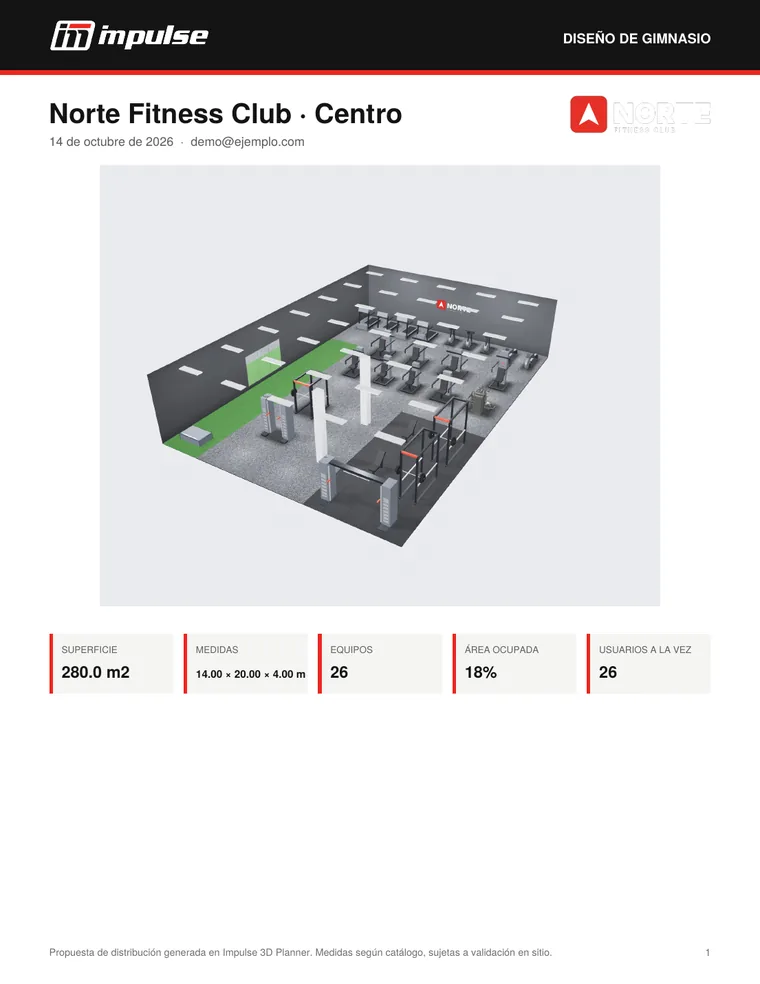
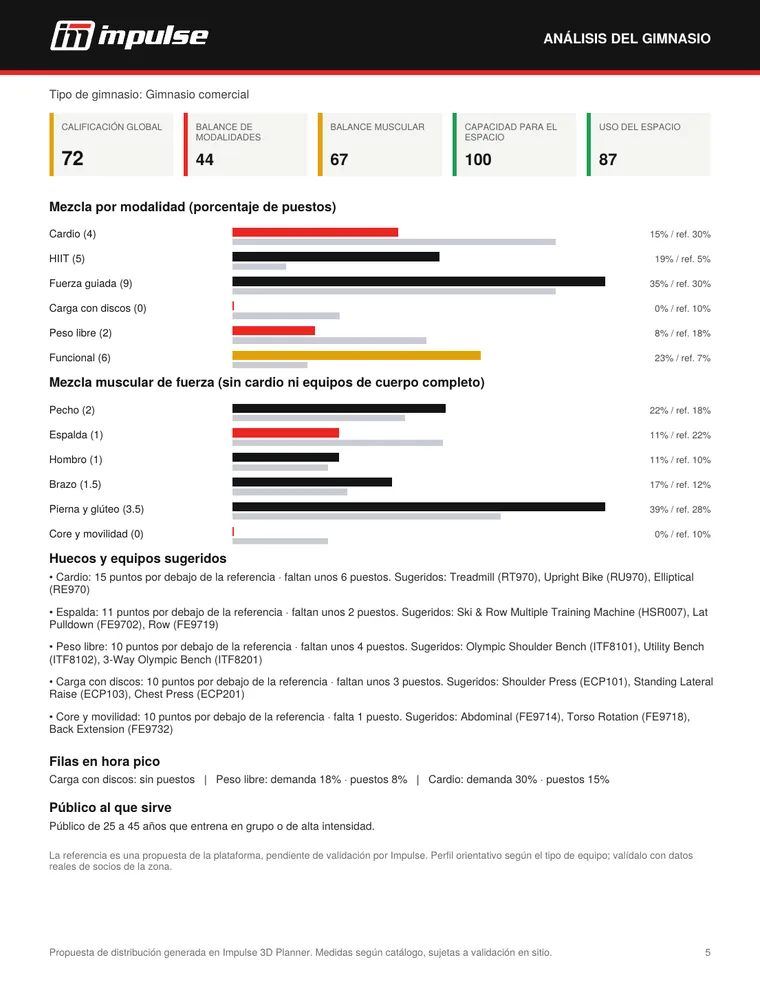
Cover with the 3D view, the logo and the summary; numbered plan, equipment table, estimated capacity and gym analysis with its scores and gaps.
From floor plan to space
The prospect uploads their floor plan and the platform turns the outline into a 3D space with floor, walls and real dimensions.
Validation while you design
Each machine is checked against the space, against the other machines and against doors and columns. Warnings appear on the plan, in the 3D view and in the summary.
Red · must be fixed
The machine overlaps another one, does not fit in the space or falls outside the traced outline.
Amber · recommendation
0.60 m
Suggested clearance between machines. It warns but does not block, and when equipment is added the platform looks for a spot that respects it.
Clear zone
1.00 m
In front of each door. Equipment that encroaches on it, or that blocks a column, is marked in red.
 3D
Drag to rotate the model
3D
Drag to rotate the model
Real 3D models
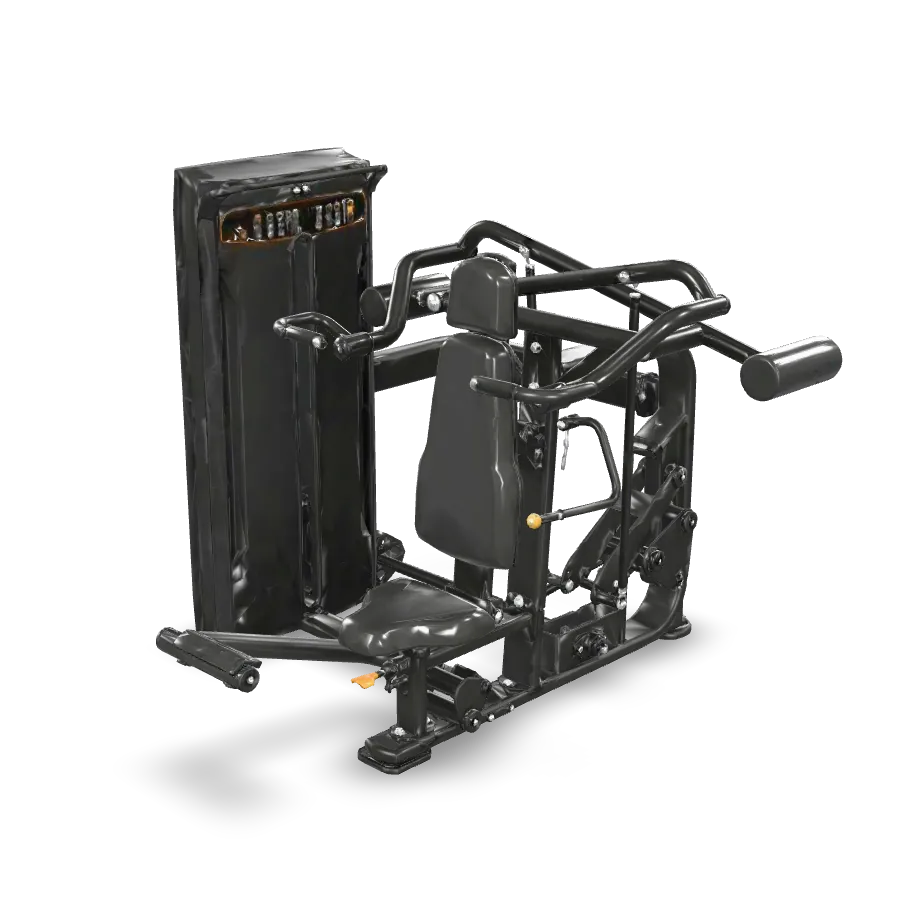
The machines are modeled in 3D from Impulse's studio photos. More than 270 are already on the platform; rotate the shoulder press here.
Machines that do not have a model yet are shown as a to-scale silhouette of their type (treadmill, bike, weight-stack machine, rack…). The layout, the validations and the PDF always use the catalog dimensions.
AI capacity copilot
The copilot takes the design and estimates how the gym will operate: people at once, visits per day, week, month and year, and how many members it can support. It then answers questions in the user's language.
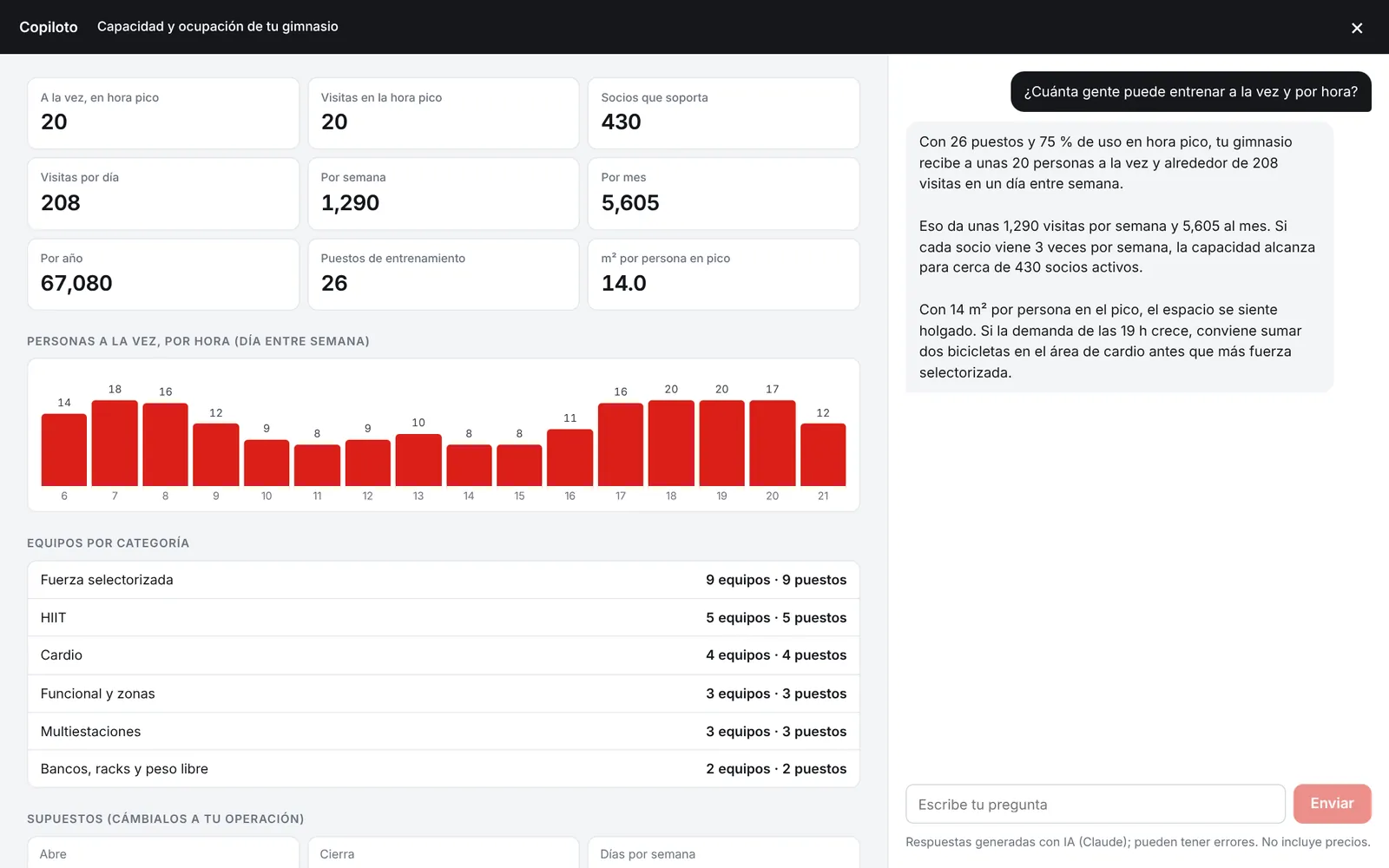
Try it
It is the same formula the copilot uses. Change the training stations or adjust the assumptions.
People at once, by hour (weekday)
An estimate, not a forecast. The hourly curve and the 60% weekend attendance are starting assumptions.
For your team · included in your plan
Whatever your prospect sends goes straight into your CRM, with its estimated value and a task to contact them within 24 hours. When the down payment arrives, the equipment is reserved in your inventory.
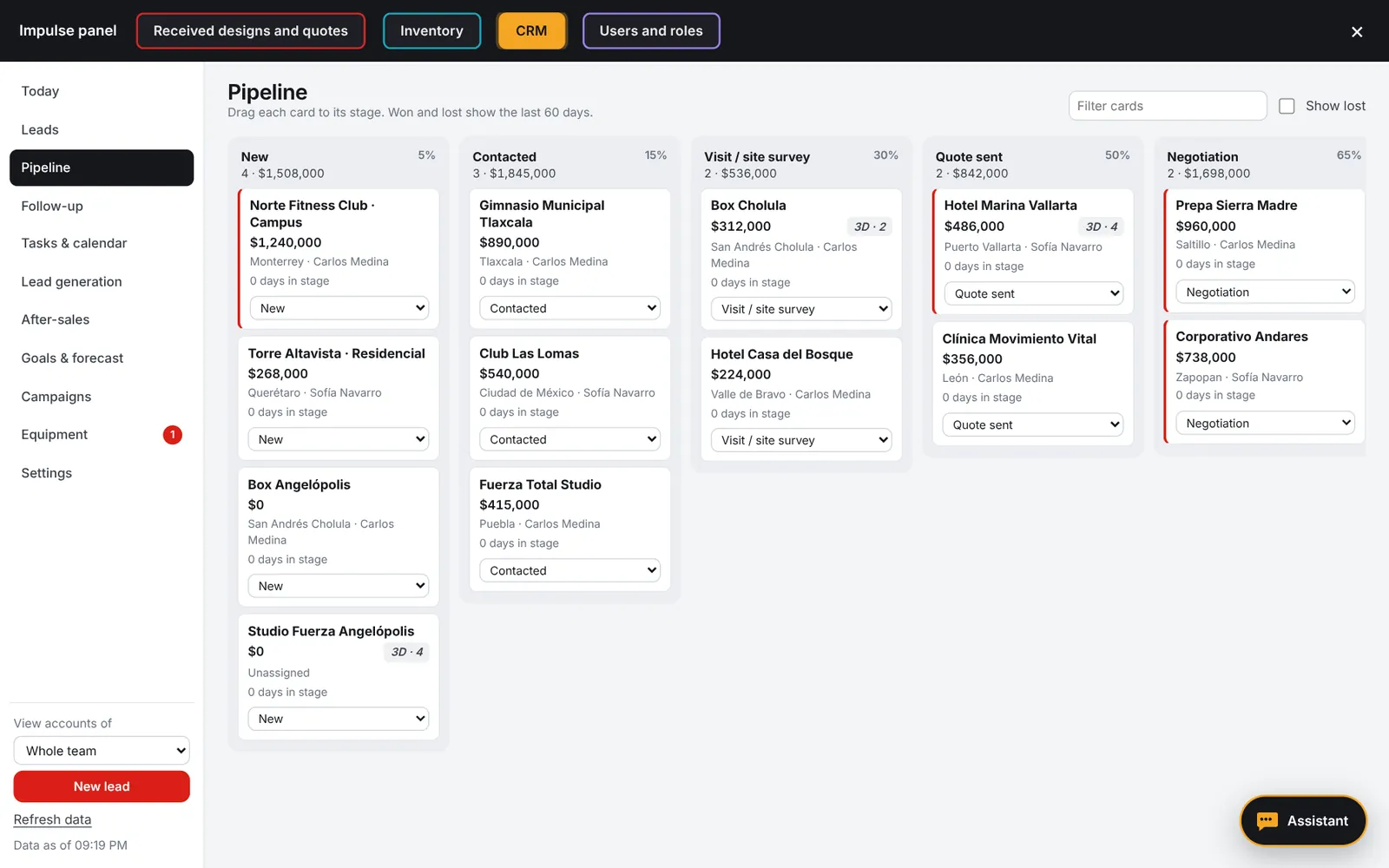
Real screenshots with fictitious data.Only your team sees your data
Pricing
3D Planner, analysis, copilot, presentation, link and flyer for prospects, CRM, inventory and quote builder for your whole team. Pay by card and cancel anytime.
One month free
Annual
USD 715per year
Pay for 11 months, use 12. Equivalent to USD 59.58 per month.
Request accessIncludes
These keep the price where it is. When you reach a limit we let you know, and it resets on the first day of the following month; everything else keeps working.
| Feature | Included |
|---|---|
| CRM and inventory AI assistant | 1,500 queries per month |
| Lead generation on Google Maps | 20 searches per month, up to 60 businesses each |
| Copilot and “Design with AI” | 40 queries per person per day |
| Team users, prospects and designs | Unlimited |
From your account. You keep access until the end of the paid period.
If a payment fails, everything keeps working and we email you every day so you can update your card.
If payment is not completed or you cancel, you can download your projects, CRM and inventory before access ends.
We then keep your information for 60 days in case any clarification is needed; after that, it is deleted.
Prices in US dollars. See the Terms of Service and the Cancellation and Refund Policy.
For Impulse distributors
The catalog is Impulse's international catalog, the same for everyone. What changes is each distributor's language, units and currency.
your-company.impulsefitness-planner.ai/?lang=pt
Dimensions in feet and inches and areas in ft²; the link accepts ?units=ft.
18 currencies, plus your country's tax name and rate on the quote.
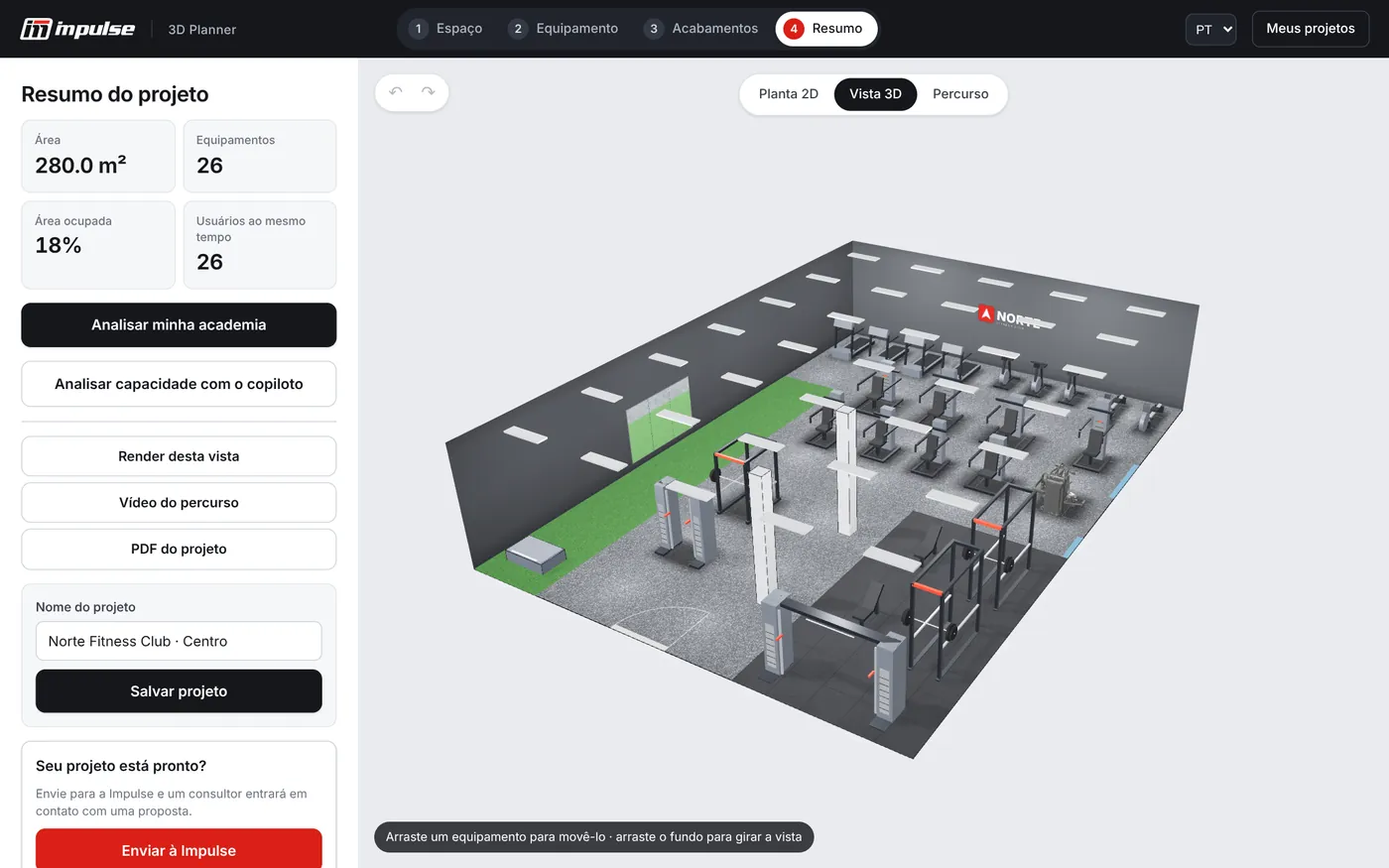
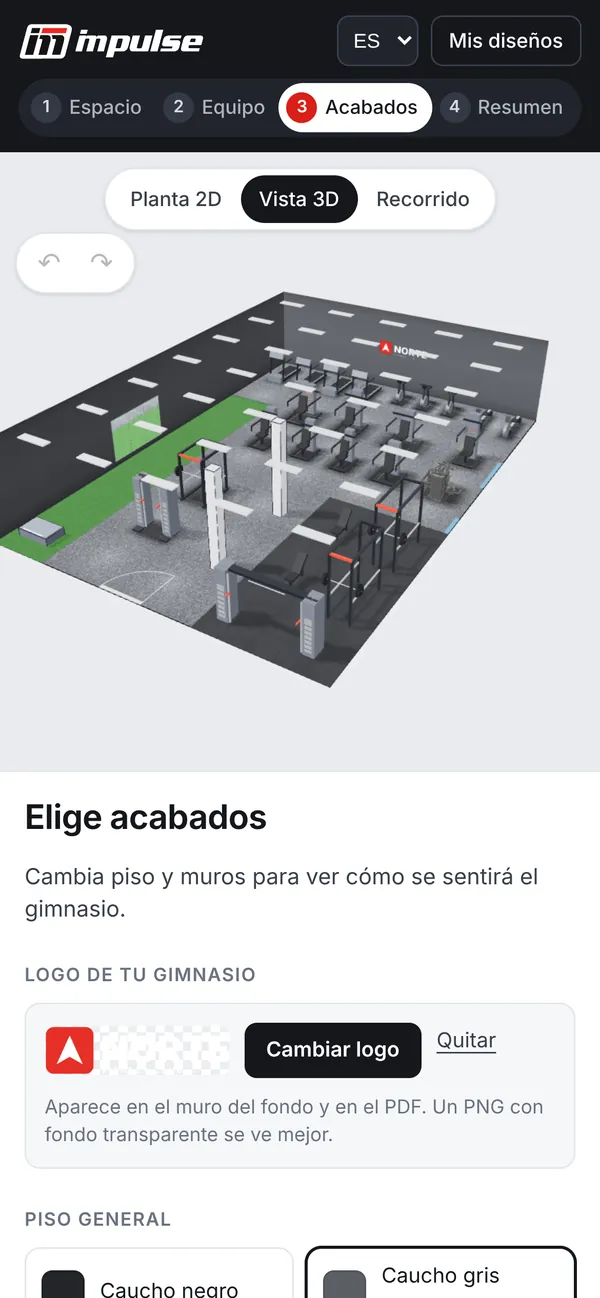
The same design in all four languages. Equipment names are kept as they appear in the Impulse catalog.
Technology and data
Works on computers, tablets and phones. The design is saved automatically in the browser while the prospect works.
Prospects sign in with a verified email or with Google. Their designs stay in “My designs” and you receive real contact details.
Permissions enforced in the database: each prospect sees only their own designs, and each distributor sees only its own CRM, inventory, prices and quotes.
The copilot and the assistants use Claude, cannot see costs and have published usage limits.
The customer's floor plan is processed in their browser. Only the traced outline is saved.
Site on Netlify; accounts, database and functions on Supabase.
Frequently asked questions
Have another question? Write it in the request form or email sales@impulsefitness-planner.ai.
Authorized Impulse distributors in any country. You send the request, and Impulse México confirms that you are a distributor and activates your account with a 7-day free trial.
USD 65 per month or USD 715 per year, which works out to one month free. Everything is included: 3D planner, analysis, copilot, presentation, link and flyer for prospects, CRM, inventory, quote builder and unlimited users, with the usage limits published under Pricing. Distributors in Mexico pay VAT on top, and Impulse México invoices them with a CFDI.
It starts when Impulse México approves your account and you register your card. If you cancel before it ends, nothing is charged; otherwise, the plan you chose is charged and renews automatically.
If a payment fails, you have a 5-day grace period with everything working and a daily email reminder to update your card. If the payment is not completed, the account is suspended and you have 7 days to download your projects, your CRM and your inventory. We then keep the information for 60 days in case any clarification is needed, after which it is deleted. If you cancel, you keep access until the end of the paid period and the same 7 and 60 days apply.
Yes, per account: 1,500 queries per month to the CRM and inventory AI assistant, 20 Google Maps searches per month with up to 60 businesses each, and 40 queries per person per day to the copilot and Design with AI. Users, prospects and designs are unlimited. We let you know when you reach a limit, and it resets on the first day of the following month.
No. Designs that come in through your link reach only you, at the email and phone number you set up, and only your team sees your CRM, inventory, prices and quotes. Prospects who arrive without a link are handled by Impulse México.
Yes. You upload your price list from Excel with cost and sale price per item code, and on each quote you add installation, shipping, discount and tax, in your country's currency. The prospect never sees costs, and neither does the salesperson.
Yes. The owner uploads their equipment list as a PDF, an Excel file or a photo; the platform finds the Impulse equivalent of each machine and shows what is missing, what is surplus, where lines form at peak hour and which equipment is worth buying or replacing. The quote you receive includes only the new equipment.
No. It works in the browser on a computer, tablet or phone. Prospects create an account with a verified email or with Google to save and send their design.
Against the benchmark for the chosen gym type: commercial, strength studio, functional or high-intensity, hotel or residential, corporate, rehabilitation and seniors, or university and school. Each benchmark sets the split of stations by modality and muscle group, the stations per 100 m² and the healthy range of occupied floor area. These are initial platform benchmarks that are being refined with Impulse.
More than 270 catalog machines already have a 3D model generated from studio photos. The rest are shown with a to-scale silhouette of their equipment type, always with the catalog dimensions, so the layout and validations are accurate.
Spanish, English, Brazilian Portuguese and French, with meters or feet. Your link can open directly in your customer's language, for example with ?lang=en or ?lang=pt.
Request access
The service is for authorized Impulse distributors. Leave us your details; Impulse México reviews your request and contacts you to activate your account and your trial.
You do not need this request: design your space for free and an Impulse advisor will contact you.
Design my gym